
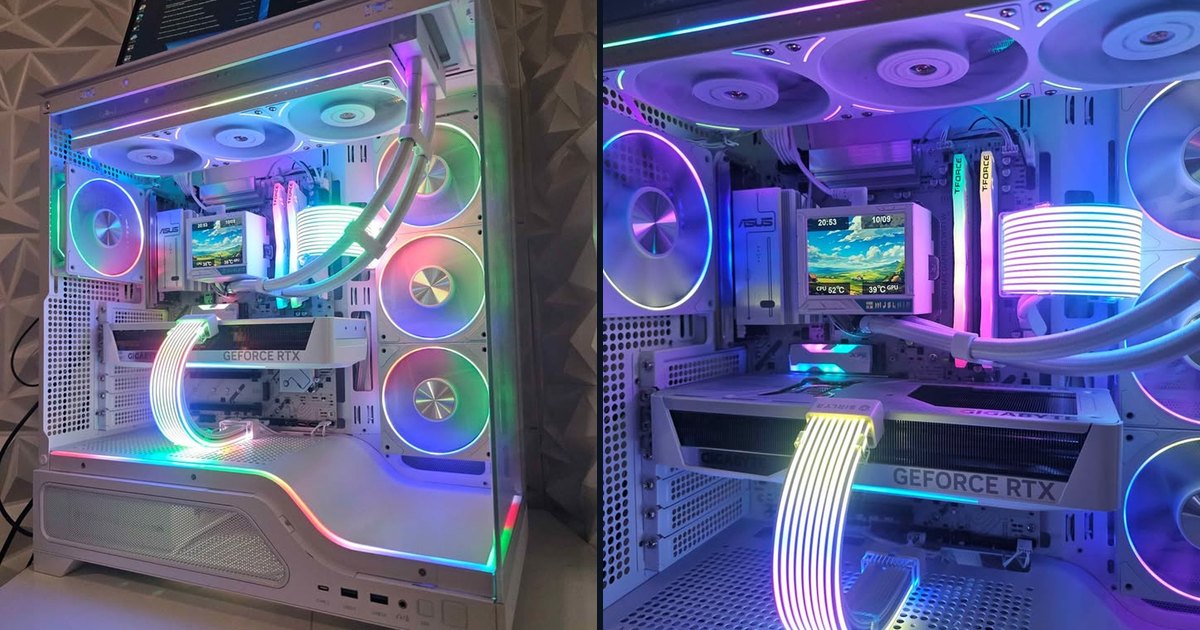
This is the build for someone who wants a white PC that plays at 1440p, without paying for the top-end processor. It pairs AMD's Ryzen 7 9700X with an RTX 5070, both in white parts, for $1,999.
Here's what it runs, why each part is there, and the one thing we'd upgrade if you stream or multitask a lot.
The spec sheet
Who this PC is for
Why these parts
Ryzen 7 9700X
The 9700X is AMD's 8-core Zen 5 processor, and it's very efficient: by default it runs at 65W, which makes it cool and quiet. It doesn't have the extra 3D V-Cache of the X3D chips, and in pure gaming that shows when the graphics card isn't the limit. In TechPowerUp's 2026 testing with an RTX 5090 at 1080p, the 7800X3D was about 7% faster and the 9800X3D about 17% faster.
But this PC has an RTX 5070, not an RTX 5090, and it targets 1440p. In that situation the graphics card sets the frame rate in most games, so the gap shrinks to a few percent in most titles. In exchange, the 9700X is faster than the 7800X3D in productivity work (TechPowerUp measured about 9% in applications) and draws less power.
GeForce RTX 5070 12GB
This is the card that decides the performance. In TechPowerUp's 2026 suite (25 games, highest settings, native, ray tracing off), the RTX 5070 averaged about 136 fps at 1080p and 101 fps at 1440p. It brings DLSS 4 upscaling, which looks very close to native resolution on Quality, plus solid ray tracing and NVIDIA's frame generation for single-player games.
The rest of the build
About the 16GB of RAM
We want to be clear about this one. 16GB is enough for most games today. Most titles use well under that, and in a PC used just for gaming you won't notice a difference.
Where 32GB starts to matter:
If that sounds like you, 32GB is the upgrade we'd suggest. The cleanest way is a matched 2×16GB kit at the same 6000MHz, and it's a ten-minute job. Ask about it when you pick up the PC and we can quote it. Our full take on 16 vs 32GB: https://quivaltech.com/blog/32gb-of-ram-for-gaming-necessary-or-marketing
Estimated performance in popular games
These FPS ranges are estimates based on published reviews of the same graphics card and processor (mainly TechPowerUp and TechSpot/Hardware Unboxed), not our own lab numbers; real results vary with settings, drivers and game patches.
At 1440p, native resolution, no frame generation
At 1080p, same settings
These are the RTX 5070's numbers from a test bench with a faster processor. With the 9700X, expect the same in GPU-heavy games and a few percent less in CPU-heavy ones such as Counter-Strike 2 at very high frame rates. Valorant and Fortnite in Performance mode run at several hundred fps either way.
About frame generation: DLSS can add AI-generated frames on top of these numbers, and in some games the counter will show two to four times more fps. They make motion smoother, but the game still responds at its real frame rate. For the reasoning, see our RTX 5060 comparison: https://quivaltech.com/blog/rtx-5060-vs-rtx-5060-ti-8gb-which-to-buy
What it doesn't do as well
Thermals, noise and upgrades
Every PC is stress-tested before we list it. A 65W processor under a 360mm radiator and an RTX 5070 makes for a very quiet machine; in most games the graphics card's fans are what you'll hear, and only faintly.
The upgrade order we'd suggest: memory to 32GB first if you multitask, then the graphics card in a few years. AM5 also leaves room for a faster processor later, X3D included, with a BIOS update.
How to get it
This exact PC is for sale now for $1,999: new parts, professionally built, stress-tested, Windows 11 Pro installed and activated, and a 60-day warranty. It's local pickup in Thousand Oaks only. We don't ship built PCs, and they're not sold through the online checkout.
See the listing and send a request: https://quivaltech.com/shop/ryzen-7-9700x-rtx-5070-white-gaming-pc
Or call or text (805) 750-3255. If it's already sold, we can build one like it, with 32GB from the start if you prefer: https://quivaltech.com/services/custom-gaming-pcs
FAQ
Is the Ryzen 7 9700X good for gaming?
Yes. At 1440p with an RTX 5070, it delivers nearly the same frame rates as an X3D chip in most games. X3D processors pull ahead in competitive shooters at very high frame rates.
Is 16GB of RAM enough for gaming in 2026?
For most games, yes. For streaming, heavy multitasking or video editing, we'd recommend 32GB, and it's an easy upgrade.
Can it play at 4K?
Lighter games, yes, and heavier ones with DLSS. If 4K is your main goal, a card with more memory makes more sense.
Can I pay online and have it shipped?
No. Built PCs are local pickup in Thousand Oaks. Contact us and we'll set up a time.
Sources: TechPowerUp graphics card reviews (2026 test suite, including the upscaling tests) and Core Ultra 5 250K Plus CPU review (relative gaming and application performance), TechSpot/Hardware Unboxed RTX 5070 review.