
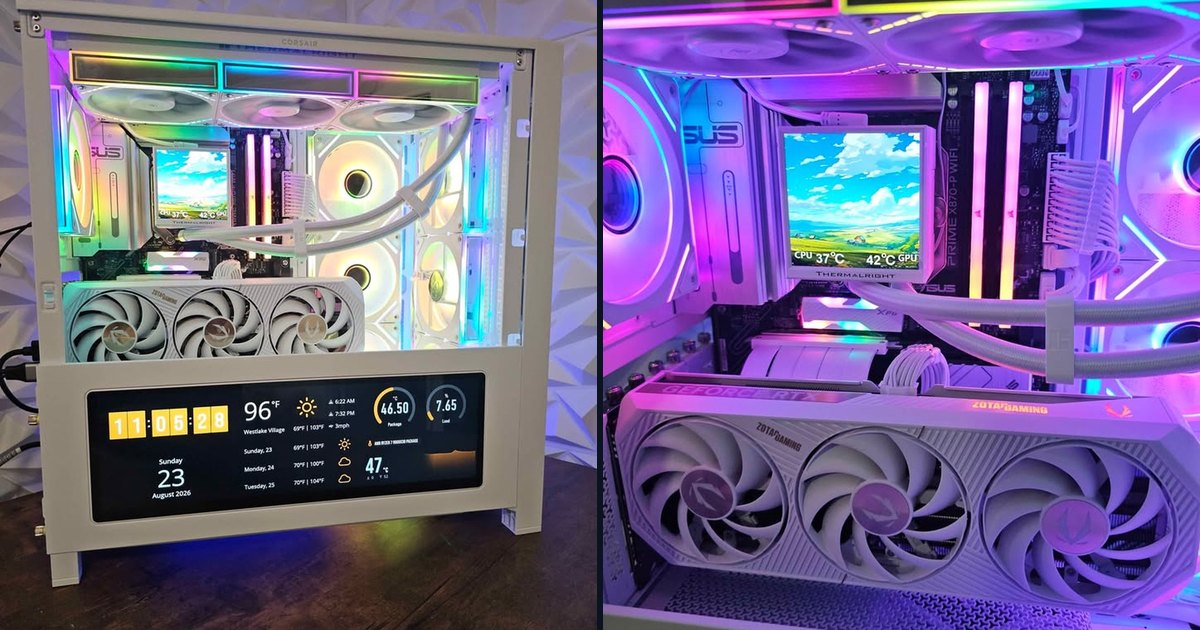
If you play competitive shooters on a 240Hz monitor, or you want 1440p at well over 100 fps in most games, the processor matters as much as the graphics card. This build starts there: a Ryzen 7 9800X3D, one of the fastest gaming processors you can buy, paired with an RTX 5070, in a Corsair case with a screen built into the front.
The spec sheet
Who this PC is for
Why these parts
Ryzen 7 9800X3D
In competitive games at high frame rates, the processor often sets the limit before the graphics card does. The 9800X3D moved AMD's extra 3D V-Cache underneath the cores, which let it run at higher clocks than the 7800X3D. In TechPowerUp's 2026 testing with an RTX 5090, it was about 9% faster than the 7800X3D at 1080p and about 17% faster than the Ryzen 7 9700X. It also tends to hold steadier minimum frame rates, the moments that feel like stutter in a firefight.
GeForce RTX 5070 12GB
In TechPowerUp's 2026 suite (25 games, highest settings, native, ray tracing off), the RTX 5070 averaged about 136 fps at 1080p and 101 fps at 1440p. In ray tracing it's clearly stronger than AMD's previous generation. It also brings DLSS 4, which matters (more on that below). The ZOTAC AMP is a factory-overclocked white model that matches the rest of the build.
The rest of the build
Estimated performance in popular games
These FPS ranges are estimates based on published reviews of the same graphics card and processor (mainly TechPowerUp and TechSpot/Hardware Unboxed), not our own lab numbers; real results vary with settings, drivers and game patches.
At 1440p, native resolution, no frame generation
At 1080p, same settings
Valorant and Fortnite in Performance mode run at several hundred frames per second on this PC. There, the processor and your monitor are the limit, and this processor is about as fast as they come.
DLSS 4: what the big numbers mean
DLSS has two parts, and it's worth separating them.
Upscaling (Super Resolution) renders the game at a lower resolution and rebuilds a sharp image with AI. These are real frames. In TechPowerUp's Cyberpunk test at 1440p with ray tracing on, the RTX 5070 goes from about 50 fps natively to about 83 with DLSS Quality. That's the setting we'd use.
Frame Generation inserts AI-generated frames between real ones. With 2x it showed about 142 fps in the same test, and with 4x Multi Frame Generation about 247. NVIDIA's DLSS 4.5 update added up to 6x. Motion looks much smoother on a high-refresh monitor, but the generated frames don't respond to your mouse: the game still feels like the roughly 80 real frames underneath, plus a little delay. Use it for single-player games. For competitive shooters, use upscaling and Reflex, and leave frame generation off.
What it doesn't do as well
Thermals, noise and upgrades
We stress-test every PC before listing it. The 9800X3D under a 360mm radiator is a comfortable pairing, and the RTX 5070 is a card of about 250W, so the whole PC stays quiet in normal gaming. The upgrade path is excellent: AM5 is supported into 2027 and beyond, and the X870 board has the bandwidth for a much faster graphics card later. With this processor, the GPU is the only thing you'll want to change for years.
How to get it
This exact PC is for sale now for $2,599: new parts, professionally built, stress-tested, Windows 11 Pro installed and activated, and a 60-day warranty. It's local pickup in Thousand Oaks only. We don't ship built PCs, and they're not sold through the online checkout.
See the listing and send a request: https://quivaltech.com/shop/ryzen-7-9800x3d-rtx-5070-corsair-lcd-gaming-pc
Or call or text (805) 750-3255. If it's already sold, we can build one like it: https://quivaltech.com/services/custom-gaming-pcs
Why frame rate isn't the only number that matters: https://quivaltech.com/blog/fps-isnt-everything-frametime-latency-and-your-monitor
FAQ
Is the 9800X3D overkill with an RTX 5070?
In single-player games at 1440p, partly, because the graphics card sets the frame rate. In competitive shooters at high frame rates, no: that's exactly where it pays off, and it leaves room for a GPU upgrade later.
Is 12GB of VRAM enough?
For 1440p today, yes, in almost every game. In the heaviest path-traced games at max textures, you'll lower textures one step.
What does the front LCD screen do?
It displays whatever you choose through Corsair's software: CPU and GPU temperatures, an image, or an animation.
Can I see it running before I buy it?
Yes. It's local pickup in Thousand Oaks, and we'll show it to you running.
Sources: TechPowerUp graphics card reviews (2026 test suite, including the upscaling and frame-generation tests) and Core Ultra 5 250K Plus CPU review, TechSpot/Hardware Unboxed RTX 5070 review.