
Este artículo está disponible por ahora solo en inglés.
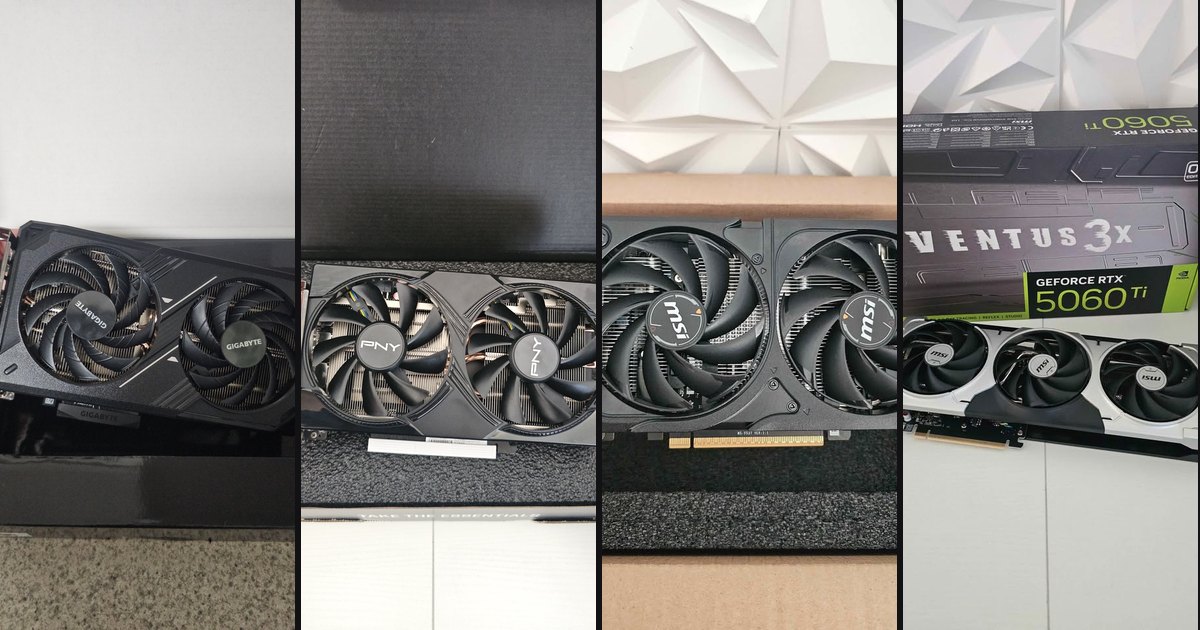
People ask us this every week: is the RTX 5060 Ti worth the extra money over the RTX 5060, and is 8GB of video memory a problem? We have four of these cards on the shelf in Thousand Oaks, so here's a straight comparison: what you gain, what you don't, and who should buy which.
The four cards we have
All four are new. The three RTX 5060s use the same chip. Factory overclocks are worth a percent or two, so pick between them by size, fans and price rather than by performance.
The specs that matter
The Ti has more cores and the same memory. That tells you most of the story: it's faster at the same settings, but it hits the same memory limit.
The real performance gap
These FPS figures are estimates based on published reviews of the same cards (mainly TechPowerUp and TechSpot/Hardware Unboxed), not our own lab numbers; real results vary with settings, drivers and game patches.
Across TechPowerUp's 25-game suite (highest settings, native resolution, ray tracing off), the RTX 5060 averaged about 91 fps at 1080p and 65 fps at 1440p. The RTX 5060 Ti 8GB averaged about 101 and 73. That's roughly 10–15% faster, depending on the game list.
At 1080p, highest settings, native, ray tracing off
At 1440p, same settings
Valorant and League of Legends run at several hundred frames per second on either card, and Fortnite in Performance mode is very fast on both. In those games your CPU and monitor set the ceiling, not the difference between these two GPUs.
So at 1080p both cards play almost everything at high settings. The Ti buys you one step: ultra instead of high, or 1440p with DLSS instead of 1080p.
The 8GB question, honestly
This is the part most "which to buy" articles skip.
Most games are fine. In TechPowerUp's averages, the 8GB RTX 5060 Ti and the 16GB version score the same at 1080p and 1440p. Most games don't fill 8GB at the settings these cards can run anyway.
Some games are not. The problems show up in specific cases:
The fix is usually one setting. When an 8GB card stutters, dropping textures one notch, from Ultra to High, solves most cases. It doesn't make the game ugly. But you will be managing that setting in some new releases over the next few years. If that sounds annoying, you want a card with 12GB or more.
PCIe 5.0 x8 and older motherboards
Both cards use only 8 PCIe lanes. On a modern PCIe 5.0 or 4.0 board that doesn't matter in normal use.
On an older PCIe 3.0 board (Ryzen 3000 on a B450, Intel 10th generation and earlier, for example) it matters only when the 8GB memory overflows. Then the card has to fetch data from system memory over a narrow link, and TechSpot measured big drops: in some games the 16GB card on PCIe 3.0 was several times faster than the 8GB one. Within the memory limit, PCIe 3.0 costs very little.
So if you're upgrading an older PC, one of these cards is still a big step up. Keep texture settings conservative, and it will run well.
DLSS 4 and frame generation, without the marketing
DLSS has two separate parts, and the difference matters:
What that means in practice: a game that renders 50 frames per second and shows "150 fps" with frame generation looks smoother, but it still responds like roughly 50 fps, plus a little extra delay. NVIDIA Reflex keeps that delay down, and reviewers generally recommend a base around 60 fps before turning frame generation on. It's great for single-player games on a high-refresh monitor. For competitive shooters, leave it off.
As an example from TechPowerUp, an RTX 5070 in Cyberpunk at 1440p with ray tracing goes from 50 fps native to 83 with DLSS Quality (real frames) and to 247 with 4x frame generation (mostly generated frames). Same game, same feel at about 80, very different number on the counter. When you see "200+ fps" in a GPU ad, check for that footnote.
Power supply and CPU pairing
Who should buy which
Want a complete PC built around this card? We can put one together for you, tested and with Windows 11 Pro installed: https://quivaltech.com/services/custom-gaming-pcs
How to get one
All four cards are new and available for local pickup in Thousand Oaks. Order from the product page and pick it up, or call or text (805) 750-3255 if you want to confirm it fits your case and power supply first. Bring your PC specs and we'll tell you honestly which one makes sense, or whether your PC needs something else first: https://quivaltech.com/blog/dont-buy-a-gaming-pc-just-for-the-gpu
FAQ
Is the RTX 5060 Ti 8GB worth $60 more than the RTX 5060?
If you play at 1080p ultra or want to try 1440p, yes: it's roughly 10–15% faster. For esports and 1080p high, the RTX 5060 is the better value.
Is 8GB of VRAM enough in 2026?
For most games at 1080p, yes. For the newest AAA games at max textures, 4K, or frame generation on top of high settings, it's tight, and you'll lower textures one step.
Will an RTX 5060 work in my old PCIe 3.0 PC?
Yes. It loses little performance as long as games stay within 8GB of memory. Keep textures conservative, and make sure the power supply is decent.
Are frame generation FPS numbers real?
They're real frames on screen, but most are AI-generated. The game still responds at its base frame rate, so judge performance by the numbers without frame generation.
Sources: TechPowerUp RTX 5060 Gaming OC review (2025 suite) and 2026 test suite, TechSpot/Hardware Unboxed RTX 5060 review, RTX 5060 Ti 8GB review and PCIe 3.0/4.0/5.0 test, NVIDIA DLSS 4.5 announcement.